


Android and iPhone File Sharing Just Got Easier With QR Codes
For years, sharing files between Android phones and iPhones has been one of the most frustrating parts of living in a mixed-device world. Apple users have long relied on AirDrop for fast wireless transfers, while Android users depended on Google’s Quick Share ecosystem. But moving files between the two platforms often required third-party apps, cloud storage links, or awkward workarounds.
Now, Google is attempting to close that gap.
The company has started rolling out a new Quick Share feature that allows Android users to send files directly to iPhones, iPads, and even Macs using a simple QR code system. The update represents another major step in Google’s broader effort to improve compatibility between Android and Apple devices and reduce the friction that users experience when sharing photos, videos, documents, and other files across ecosystems.
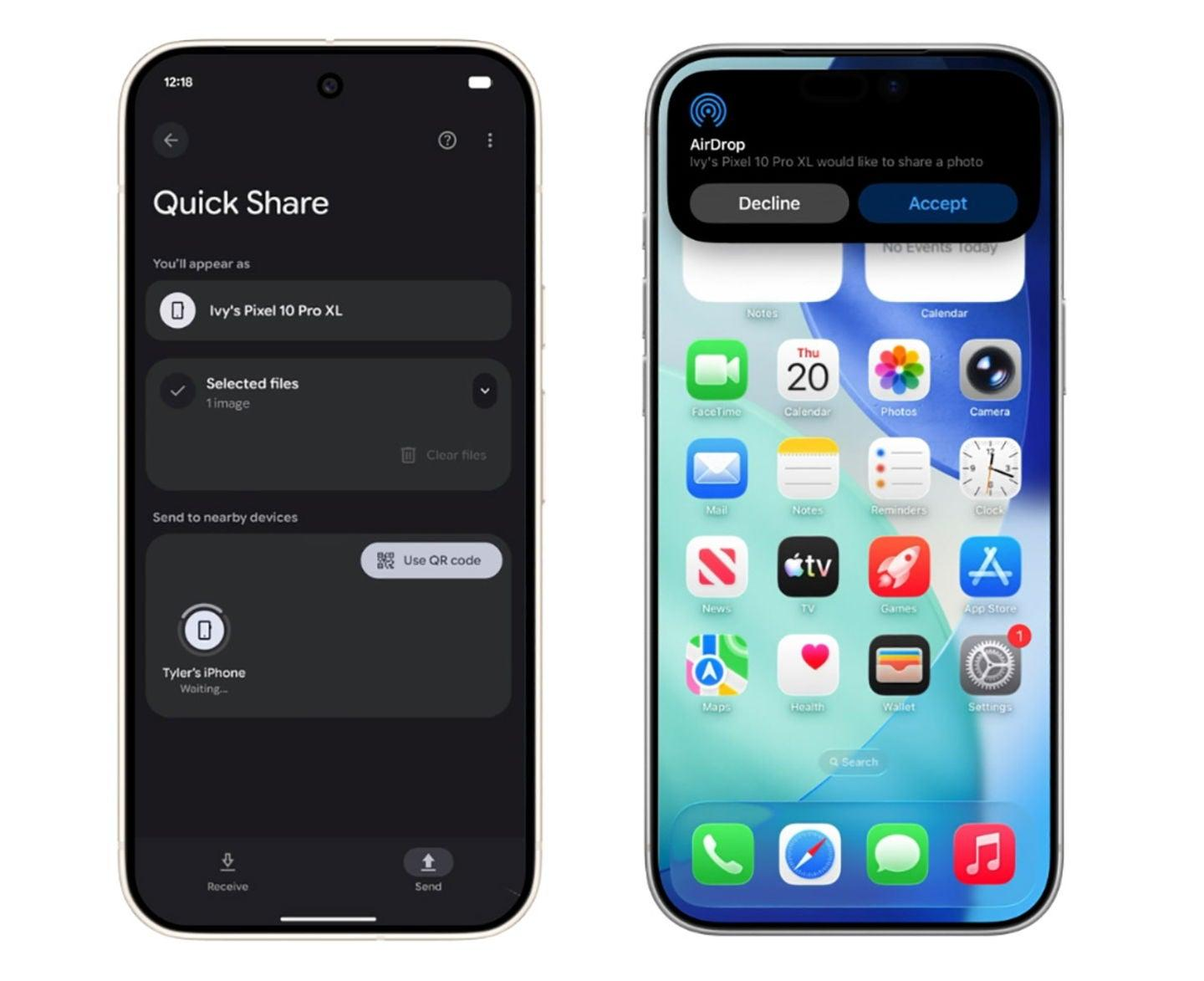
A Simpler Way to Share Across Platforms
The new feature works through Google’s Quick Share platform, Android’s native file-sharing system. Instead of requiring direct AirDrop compatibility or installing additional apps, Android users can now generate a QR code while sharing files.
The recipient simply scans the QR code using the iPhone’s Camera app. Once scanned, the files become available through a secure Google-hosted webpage, allowing the transfer to complete through the browser.
Google says the system uses end-to-end encryption, and the uploaded files remain available for only 24 hours before they expire automatically.
The process is designed to feel significantly more seamless than traditional cross-platform file transfers, which often involve emailing files, uploading them to cloud storage manually, or using messaging apps that compress media quality.
Why Google Introduced the Feature
The QR code method arrives as part of Google’s larger strategy to improve Android and iPhone interoperability.
During “The Android Show: I/O Edition,” Google announced several initiatives focused on reducing the barriers between Android and Apple devices. One major highlight was expanded support for Quick Share and AirDrop compatibility across more Android phones.
Google also revealed improvements aimed at helping users switch from iPhones to Android devices more easily. According to the company, future migrations will support more advanced data transfers, including passwords and even home screen layouts.
However, native AirDrop compatibility is not yet available on every Android device.
That hardware limitation created a need for an alternative solution — and the QR code system appears to be Google’s answer.
Instead of relying entirely on device-to-device wireless compatibility, the QR method uses cloud-assisted transfers, ensuring that even older or unsupported Android phones can still share files with Apple devices.
How the QR Code File Sharing Works
The feature is relatively straightforward:
- An Android user opens Quick Share.
- They select the files they want to send.
- A new option labeled “Share with iPhone and other devices” generates a QR code.
- The iPhone user scans the QR code using the Camera app.
- The files open through a secure download page in the web browser.
- The recipient downloads the files directly to their device.
Google notes that both devices need internet access for the transfer to work because the files are temporarily uploaded to Google’s servers.
Importantly, the uploaded content does not count against the sender’s personal Google Drive storage quota.
Security and Privacy Protections
Cross-platform file sharing raises obvious privacy concerns, especially when transfers rely on cloud infrastructure instead of local peer-to-peer communication.
Google says the system includes several safeguards:
- Files are protected with end-to-end encryption.
- Shared files automatically expire after 24 hours.
- Files are transferred through private download links.
- Personal Google Drive storage is not used for hosting.
However, there is one important limitation users should keep in mind: anyone who has access to the QR code can potentially download the files.
That means users should only share the QR code with trusted recipients and avoid displaying it publicly.
Transfer Limits and File Caps
Google has also placed several limits on the feature during its rollout phase.
According to the company’s support documentation:
- Users can share up to 10GB of files every 24 hours.
- Up to 1,000 individual files can be shared in a single session.
- Files can be sent to as many as 20 Apple device recipients simultaneously.
Those limits should still be sufficient for most everyday users sharing photos, documents, presentations, or short videos.
Rollout Is Happening Gradually
Although Google has officially announced the feature, availability is still inconsistent.
Reports indicate that some Android devices have already received the update, while others are still waiting. Early testing on devices including the Oppo Find X9 Pro and Google Pixel 8a reportedly showed that the feature had not yet appeared, suggesting that Google is deploying it gradually across regions and manufacturers.
The company expects the feature to become broadly available over the coming weeks.
More Than Just a Convenience Feature
While the update may seem small on the surface, it reflects a broader shift in the smartphone industry.
Historically, Apple and Google ecosystems operated largely in isolation from one another. Features like AirDrop became defining parts of Apple’s tightly controlled ecosystem, while Android relied on its own standards and tools.
But consumer behavior has changed.
Today, many households, workplaces, and classrooms use a mix of Android phones, iPhones, tablets, Windows PCs, and Macs. Cross-platform compatibility has become increasingly important as users expect services and devices to work together more naturally.
Google’s QR-based Quick Share system is part of a growing trend toward reducing ecosystem lock-in and improving interoperability.
Native AirDrop Compatibility Is Still the Bigger Goal
Despite the usefulness of the QR code solution, Google still appears focused on expanding native Quick Share-AirDrop compatibility.
The company has already confirmed broader support for more Android brands, including:
- OPPO
- OnePlus
- Vivo
- Xiaomi
- HONOR
That expansion could eventually allow more Android devices to communicate directly with Apple hardware without needing cloud uploads or QR code workarounds.
Still, until universal compatibility arrives, the QR-based method offers a practical fallback solution that works across virtually any modern smartphone.
Quick Share’s Future Could Extend Beyond Devices
Google is also reportedly working to integrate Quick Share into third-party apps like WhatsApp.
If that happens, Quick Share could evolve from a basic Android utility into a broader cross-platform sharing layer embedded inside commonly used applications.
Such integration would make sharing files between Android and Apple devices even more seamless and could challenge the dominance of existing cloud-sharing workflows.
A Small Feature With Big Implications
The ability to share files easily across platforms may not sound revolutionary, but it addresses one of the most persistent annoyances in modern mobile computing.
For years, Android and iPhone users have dealt with awkward compatibility gaps whenever they wanted to send photos, videos, PDFs, or documents to one another.
Google’s new QR-based Quick Share feature does not completely eliminate those differences yet. Native AirDrop compatibility remains limited, and the cloud-based system still requires internet access.
But the update represents meaningful progress.
By simplifying file sharing between Android phones and Apple devices, Google is acknowledging a reality that users have known for years: people no longer live entirely inside a single tech ecosystem. The easier companies make it to move content across platforms, the more useful smartphones become for everyone.


