

Samsung Accelerates the Android 17 Race With One UI 9 Beta for Galaxy S26
Samsung has officially opened the next chapter of its Android software strategy by announcing the One UI 9 beta program for the Galaxy S26 series. Built on Android 17, the new beta introduces a broad mix of customization upgrades, accessibility improvements, AI-powered creativity tools, and stronger privacy protections — while also signaling Samsung’s increasingly aggressive software release cycle.
- Samsung Expands Its Software Momentum
- A More Flexible and Personalized Interface
- Creativity Tools Receive Major Attention
- Accessibility Improvements Become a Core Focus
- Privacy and Security Receive Stronger Protections
- Samsung’s Timing Is Strategic
- Beta Rollout Still Comes With Warnings
- What One UI 9 Means for Samsung’s Future
- The Road Ahead
The beta rollout begins this week for the Galaxy S26, Galaxy S26+, and Galaxy S26 Ultra, putting Samsung among the earliest major smartphone manufacturers to adopt Android 17 features ahead of Google’s expected announcements during its Android Show I/O Edition and Google I/O 2026 events.
The move highlights Samsung’s growing confidence in delivering faster Android updates while continuing to refine its own software ecosystem through One UI.


Samsung Expands Its Software Momentum
The announcement comes shortly after Samsung completed the rollout of stable One UI 8.5 updates for several Galaxy devices, including the Galaxy S25 and Galaxy S24 lineups. Instead of slowing down after that release, Samsung has quickly shifted focus toward its next-generation software platform.
One UI 9 beta is initially launching in:


- South Korea
- Germany
- The United Kingdom
- The United States
Samsung later clarified that India and Poland will join during a second rollout wave beginning on May 26.
Eligible users can enroll through the Samsung Members app.
The first beta firmware arrives with version S94xBXXU2ZZEF for European models and S94xNKSU2ZZEF in South Korea. The update package exceeds 3.6GB and also includes the May 2026 Android security patch.
A More Flexible and Personalized Interface
One UI has long focused on usability and customization, but Samsung is taking that philosophy further with One UI 9.


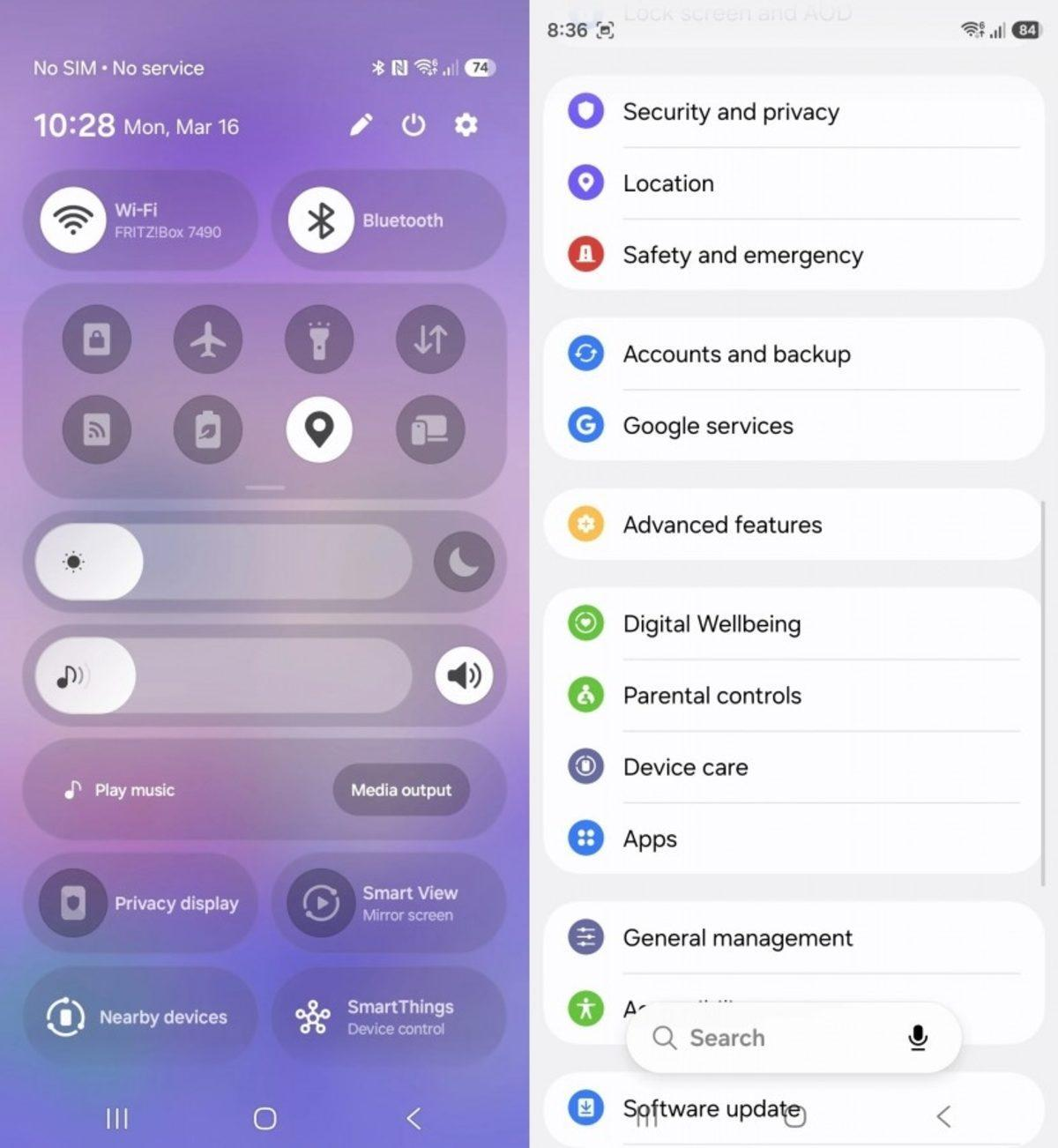
One of the most noticeable changes is the redesigned Quick Panel. Users now gain far more control over how system controls are arranged and displayed.
Redesigned Quick Panel
The updated Quick Panel introduces:
- Independent controls for brightness, sound, and media playback
- Adjustable slider sizes
- Separate sound mode controls
- Expanded layout customization options
The redesign aims to reduce friction during everyday use while giving users more freedom to organize frequently used controls.
Samsung is also improving multitasking for desktop-style workflows through upgrades to Samsung DeX.
Samsung DeX Improvements
New DeX enhancements include:
- Easier movement of app windows between desktops
- Desktop previews in the Recents menu
- Faster workspace switching
These additions continue Samsung’s push to position Galaxy devices as productivity tools capable of replacing traditional computing tasks in some scenarios.
Creativity Tools Receive Major Attention
Samsung is leaning heavily into AI-assisted personalization and content creation in One UI 9.
Creative Studio Comes to Contacts
The Samsung Contacts app now integrates direct access to Creative Studio AI tools. Users can create personalized profile cards without switching applications.
Samsung says the feature is designed to simplify profile customization while making social interactions more expressive inside the Galaxy ecosystem.
The company notes that Creative Studio requires:
- Samsung Account login
- Internet connection
- Separate Creative Studio app installation
Availability may vary depending on country, language, or device model.
Samsung Notes Gains “Tape” Feature
Samsung Notes also receives one of the update’s more unusual additions: a new “Tape” tool.
The feature allows users to cover parts of their notes and reveal them later when needed, creating new possibilities for:
- Study materials
- Flashcards
- Presentations
- Brainstorming workflows
Additional pen styles and decorative tape designs are also included, expanding note personalization options for both casual and professional users.
Accessibility Improvements Become a Core Focus
One UI 9 places significant emphasis on accessibility, reflecting a broader industry trend toward inclusive software design.
Unified TalkBack Experience
Samsung and Google have collaborated to combine their previously separate TalkBack implementations into a unified package. Updates can now be distributed directly through the Google Play Store rather than relying solely on firmware updates.
This could dramatically improve how quickly accessibility features evolve over time.
Text Spotlight
A new “Text Spotlight” feature enlarges and highlights selected text inside floating windows, helping users read more comfortably.
Users can customize:
- Font size
- Color
- Presentation settings
Enhanced Keyboard and Mouse Accessibility
Additional accessibility updates include:
- Adjustable Mouse Key speed and acceleration
- Physical keyboard shortcuts for Accessibility settings
- Easier “Replace swipe with single tap” controls
- Expanded “Select to speak” audio readouts
These improvements aim to make Galaxy devices more adaptable for users with mobility or vision-related accessibility needs.
Privacy and Security Receive Stronger Protections
Security is another major focus area in One UI 9.
Samsung says the system will now proactively detect potentially dangerous applications using updated internal threat assessments.
When suspicious apps are identified, One UI 9 can:
- Warn the user
- Block installation
- Prevent execution
- Recommend deletion
Samsung described the system as part of ongoing “security policy updates” designed to strengthen protection against evolving mobile threats.
Improved Location Transparency
The beta also introduces a new blue location-access indicator displayed at the top of the screen whenever an app actively uses location data.
Users can tap the indicator to immediately identify which application is accessing their location.
The addition mirrors broader Android privacy trends emphasizing transparency and user awareness.
Samsung’s Timing Is Strategic
Samsung’s decision to announce One UI 9 ahead of Google’s formal Android 17 showcase appears highly deliberate.
Google is expected to discuss Android 17 extensively during Google I/O 2026 on May 19–20, but Samsung has already managed to dominate headlines by shipping beta software first.
This timing demonstrates how Samsung increasingly sees software as a competitive differentiator rather than simply a hardware companion.
The company also confirmed that the full One UI 9 experience will debut later this year alongside the next generation of Galaxy Z foldables.
Industry observers expect Samsung’s next Unpacked event to take place in July, continuing the company’s recent launch tradition.
Beta Rollout Still Comes With Warnings
Despite the excitement surrounding the release, Samsung and early testers continue to caution users about installing beta software on primary devices.
As with most beta programs, One UI 9 may contain:
- Stability issues
- App compatibility problems
- Battery inconsistencies
- Performance bugs
Users interested in testing the beta are advised to back up important data before installation.
To install the update:
- Register through the Samsung Members app
- Open Settings
- Navigate to Software Update
- Tap “Check for updates”
- Download and install the firmware
What One UI 9 Means for Samsung’s Future
The One UI 9 beta reveals more than just new features — it highlights Samsung’s broader strategy for the Android ecosystem.
Several trends are becoming increasingly clear:
Faster Update Cycles
Samsung is shortening the gap between major releases, allowing Galaxy devices to remain closer to Google’s Android roadmap.
AI Integration Everywhere
Creative Studio and personalization tools show Samsung embedding AI deeper into everyday mobile experiences.
Accessibility as a Competitive Strength
The scale of accessibility updates suggests Samsung now views inclusive design as a central pillar rather than a secondary feature.
Stronger Ecosystem Lock-In
Features optimized specifically for Galaxy devices — including Creative Studio sharing and DeX improvements — reinforce Samsung’s ecosystem strategy.
The Road Ahead
The One UI 9 beta rollout is only the beginning.
Additional beta builds are expected over the coming weeks, with more Galaxy devices likely joining the testing program later this year.
If Samsung maintains its current schedule, the stable version of One UI 9 could arrive alongside the next Galaxy Z Fold and Galaxy Z Flip devices this summer.
For Samsung users, the beta represents an early look at the company’s evolving vision for Android — one increasingly centered on AI-driven personalization, stronger security, deeper productivity tools, and faster platform adoption.
As Android 17 officially approaches, Samsung has already made one thing clear: it intends to remain at the forefront of the Android software race.