


Galaxy Enhance-X Update: Samsung Turns Smartphones Into Full Creative Studios
A Major Leap Beyond Photo Editing
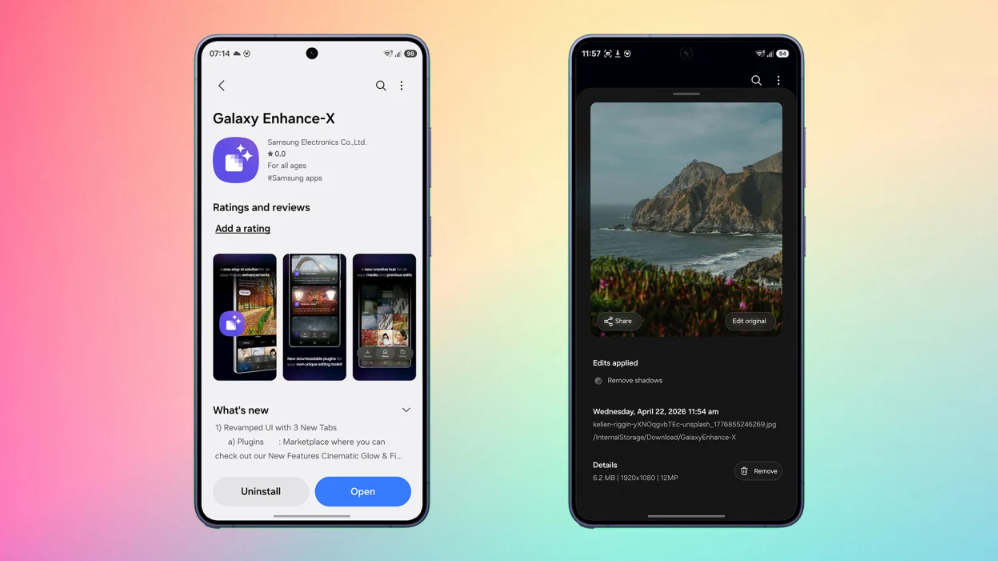
Samsung has rolled out a substantial upgrade to its Galaxy Enhance-X app, transforming what was once a specialized photo-enhancement tool into a comprehensive, AI-powered media editing suite. The latest version—16.3.00.31—introduces a redesigned interface, expanded capabilities for video and document editing, and a modular plugin system that signals a broader strategic shift in how Samsung envisions mobile creativity.
At its core, the update reflects a simple but ambitious idea: your smartphone should be able to handle nearly every creative task—without relying on multiple third-party apps.
From Simple Enhancer to All-in-One Editing Platform
Galaxy Enhance-X has long been known as a powerful AI-based tool for improving photos. With features like blur correction, reflection removal, HDR tuning, and sharpening, it offered one-tap enhancements that appealed to both casual users and photography enthusiasts.
Now, Samsung has significantly expanded its scope.
The updated app supports:
- Photo editing (existing, enhanced tools)
- Video editing with creative effects
- Document editing, conversion, and annotation
This evolution effectively merges three categories—media editing, scanning, and productivity—into a single application. As one report notes, the app now spans “images, videos and even documents,” marking a decisive shift toward an integrated creative workflow .
A Cleaner, Smarter Interface
One of the most noticeable changes is the redesigned interface. Samsung has replaced the older layout with a streamlined three-tab system:
1. Plugins
A new hub for downloadable add-ons such as:
- CinematicGlow
- FilmStyle
- SkyGuide
These plugins introduce specialized effects, from cinematic filters to astrophotography enhancements, effectively turning the app into a modular platform.
2. Home
The central editing workspace where users:
- Select photos, videos, or documents
- Apply enhancements and effects
- Access AI-powered tools
3. History
A workflow tracker that logs previous edits, allowing users to revisit or undo changes.
This redesign improves usability while aligning with Samsung’s broader One UI evolution, which emphasizes simplicity and AI-driven interactions.
Video Editing Joins the Toolkit
For the first time, Galaxy Enhance-X goes beyond still images to offer video editing capabilities.
Users can now:
- Trim clips
- Apply slow-motion effects
- Use creative tools like “Single Take” and looping highlights
- Preview edits before saving
These additions bring the app closer to lightweight video editing software, reducing the need for separate apps.
According to user-facing descriptions, features like slow motion allow users to “press and hold at any point in the timeline” to add effects seamlessly .
Document Editing: A Surprising Expansion
Perhaps the most unexpected—and significant—upgrade is the introduction of document editing tools.
The app now allows users to:
- Convert documents into JPEG or PDF
- Annotate with text, highlights, and drawings
- Translate scanned text
- Crop and enhance scanned documents
- Combine multiple scans into a single file
- Perform batch editing
This effectively places Enhance-X in competition with productivity apps, blurring the line between media editing and document management.
AI at the Core of Everything
The backbone of the Enhance-X update is Samsung’s growing investment in AI.
The app uses artificial intelligence to:
- Detect and correct imperfections automatically
- Enhance lighting and color balance
- Improve sharpness and reduce noise
- Apply creative transformations with minimal user input
With a single tap, content can be “analyzed for imperfections, enhanced and refined to a higher quality,” demonstrating how AI is simplifying complex editing tasks.
Batch processing further amplifies efficiency, allowing multiple files to be enhanced simultaneously—a feature typically reserved for desktop software.
A Strategic Shift: Competing With Desktop Tools
Industry observers see this update as part of a broader strategy.
Samsung is moving toward:
- Reducing reliance on third-party apps
- Strengthening its ecosystem
- Positioning Galaxy devices as creative workstations
The introduction of plugins mirrors professional desktop tools like Photoshop, where users expand capabilities through add-ons. Bringing this model to smartphones signals a push toward professional-grade mobile workflows.
As one analysis puts it, smartphones are “no longer just cameras with editing apps—they are becoming full-fledged creative platforms” .
Not Without Issues: User Complaints Surface
Despite the ambitious upgrade, the rollout has not been entirely smooth.
Some users have reported:
- Installation issues, including update loops
- App crashes after updating
- Difficulty accessing new features
Reports from regions including the United States, Korea, and Israel suggest the issue is not isolated, though it does not affect all users .
A temporary workaround—sideloading the APK—has been suggested by some users, but Samsung has yet to officially address the problem.
Why This Update Matters
The Galaxy Enhance-X update is more than just a feature expansion—it reflects a shift in how mobile devices are used.
For everyday users:
- Fewer apps are needed for editing tasks
- AI simplifies complex processes
- Faster, one-tap improvements improve usability
For creators and professionals:
- Plugin support enables deeper customization
- Batch editing speeds up workflows
- Video and document tools expand creative possibilities
For Samsung:
- Strengthens ecosystem lock-in
- Differentiates Galaxy devices in a competitive AI market
- Positions smartphones as primary creative tools
The Future of Mobile Creativity
This update arrives at a time when competition in AI-driven editing tools is intensifying. Companies are racing to integrate advanced features directly into devices, reducing dependence on cloud services and third-party apps.
Samsung’s approach—combining AI, modular plugins, and multi-format editing—suggests a future where:
- Smartphones replace many desktop editing tasks
- AI handles most technical complexity
- Creative workflows become faster and more accessible
If the company continues refining the experience—and resolves current stability issues—Galaxy Enhance-X could become a cornerstone of Samsung’s software ecosystem.
Conclusion
The updated Galaxy Enhance-X app represents one of Samsung’s most ambitious software upgrades in recent years. By expanding beyond photos into video and document editing, introducing a plugin-based system, and leveraging AI at every level, the company is redefining what a smartphone editing app can be.
While early technical issues may slow adoption for some users, the direction is clear: Samsung is turning Galaxy devices into powerful, all-in-one creative platforms.
And if this trajectory continues, the distinction between mobile and desktop editing may soon become irrelevant.


