

WhatsApp Liquid Glass UI Explained: What’s Changing in the App
A Fresh Visual Identity for the World’s Most Popular Messaging App
WhatsApp is preparing one of its most significant visual overhauls in years. The upcoming “Liquid Glass” UI design signals a shift toward a more modern, fluid, and visually dynamic interface—bringing the messaging giant closer in line with contemporary mobile design trends.
First hinted at in late 2025 through beta builds, the redesign is now taking clearer shape. While still not widely available—even among beta users—the new interface has been partially activated and previewed, offering a glimpse into what could soon become the default WhatsApp experience.
But what exactly is changing, and why does it matter?
What Is the “Liquid Glass” Design?
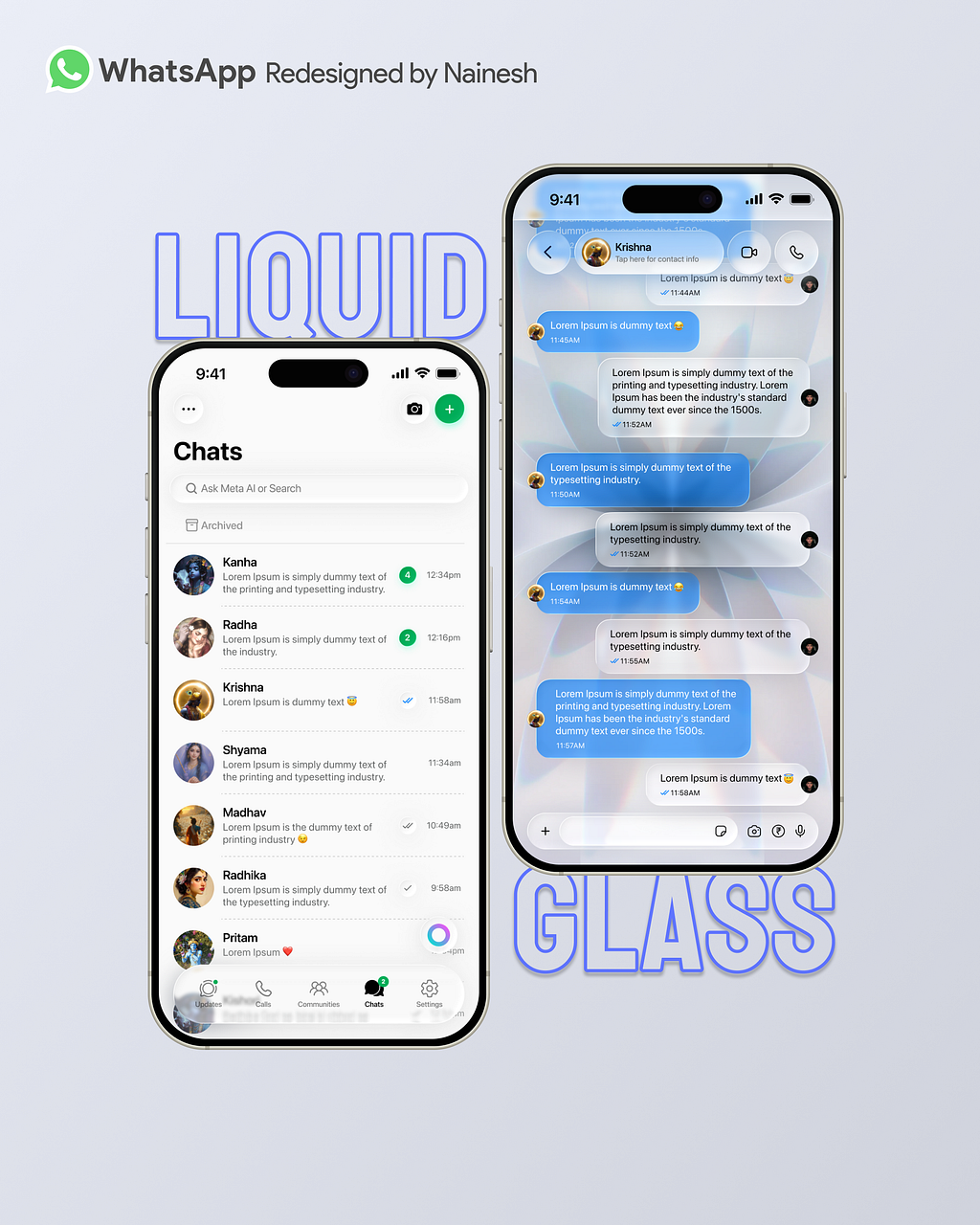
At its core, the Liquid Glass design language emphasizes transparency, depth, and motion. Inspired by Apple’s latest iOS aesthetic, the approach replaces flat, rigid UI elements with softer, layered visuals that mimic glass-like surfaces.
The goal is not just visual polish—it’s about making the interface feel more intuitive and immersive.
According to reports, the redesign introduces:
- Translucent layers that create a glass-like appearance
- Soft blur effects and reflections for added depth
- Smooth, responsive animations across interactions
- Dynamic light and dark mode adaptation
- A cohesive visual system, including updated buttons and keyboard styling
These elements combine to produce a cleaner, more fluid user experience that feels both modern and lightweight.
The Most Noticeable Changes Inside WhatsApp
1. Floating Chat Bar and Navigation
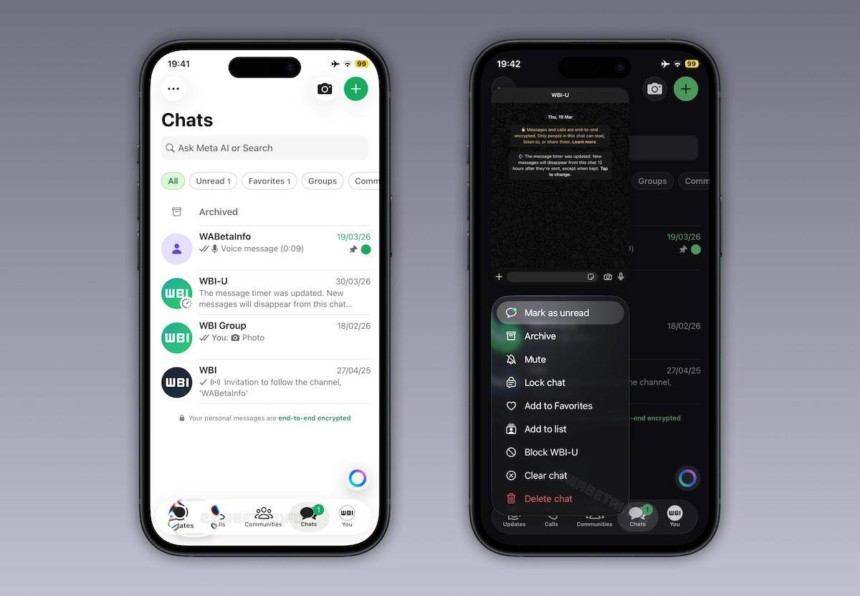
One of the most striking changes is the introduction of a floating chat bar. Instead of being anchored rigidly to the screen, navigation elements now appear lighter and more fluid.
- The navigation bar becomes translucent and “floats” above content
- It reduces visual clutter while maintaining accessibility
- The design improves focus on conversations themselves
This subtle shift dramatically changes how users perceive the interface.
2. A More Fluid Chat Experience
The chat screen—the heart of WhatsApp—is also getting a major upgrade.
- Smoother animations when opening chats or switching threads
- Improved spacing and layout for better readability
- Enhanced visual hierarchy to prioritize messages
The redesign aims to make interactions feel seamless rather than mechanical.
3. Refined Buttons and Menus
WhatsApp is rethinking even its smallest UI components.
- Buttons now feature soft blur effects and rounded visuals
- Menus are cleaner, simpler, and easier to tap
- The overall interface feels less dense and more breathable
This aligns with broader trends toward minimalism in mobile UX design.
4. Integrated Keyboard and Voice Features
The keyboard and voice tools are also evolving:
- The keyboard design blends more naturally with the UI
- The voice note player is being improved for better usability
- Visual consistency is maintained across all interaction points
These refinements may seem minor, but they significantly enhance day-to-day usability.
Why WhatsApp Is Making This Change
This redesign is not happening in isolation. It reflects a broader industry shift toward:
- More immersive interfaces
- Cross-platform design consistency
- Higher expectations for visual polish
Apple’s adoption of Liquid Glass-style UI in recent iOS versions has clearly influenced the direction. WhatsApp, owned by Meta, appears to be aligning its design language with these evolving standards—especially as competition in messaging apps intensifies.
At the same time, the changes are designed to improve usability, not just aesthetics. By simplifying navigation and reducing visual friction, WhatsApp aims to make communication faster and more intuitive.
Rollout: Why You Haven’t Seen It Yet
Despite the excitement, most users have not experienced the new design.
Here’s why:
- The feature is still under testing and not fully released
- Even beta users lack access to the complete redesign
- Early previews were manually activated by researchers
Meta is taking a gradual rollout approach, likely to avoid disruptions across its massive global user base.
To check if you have access:
- Update WhatsApp via the App Store or Play Store
- Open the app and look for visual changes
- If nothing appears, you’ll need to wait
There is currently no manual way to enable the new UI
iOS First, Android Later?
Current testing suggests the Liquid Glass UI is being prioritized for iOS 26 devices, with Android users potentially waiting longer.
This staggered rollout strategy is common, allowing WhatsApp to:
- Test performance in controlled environments
- Refine design consistency across platforms
- Address bugs before a global launch
The Bigger Picture: More Than Just a Redesign
While the visual changes are the headline feature, they hint at something larger.
WhatsApp is quietly evolving into a more polished, platform-level communication tool, not just a messaging app. Alongside the redesign, the platform has been testing:
- Notification bubbles
- Subscription features
- Encrypted cloud backups
- Noise cancellation for calls
Together, these updates suggest a long-term strategy focused on premium user experience and expanded functionality.
What This Means for Users
For everyday users, the Liquid Glass redesign promises:
- A cleaner, more modern interface
- Faster and smoother navigation
- Better visual clarity in chats
- A more cohesive app experience
However, patience will be required. The rollout is slow, and full availability may take weeks—or even longer.
Final Thoughts: A Subtle but Significant Shift
WhatsApp’s Liquid Glass UI is not a radical reinvention—but it is a meaningful evolution.
By blending modern aesthetics with practical usability improvements, the app is positioning itself for the next phase of mobile communication. The changes may appear subtle at first glance, but they fundamentally reshape how users interact with one of the world’s most widely used platforms.
As the rollout continues, the question is no longer if the new design will arrive—but when it will reach your device.